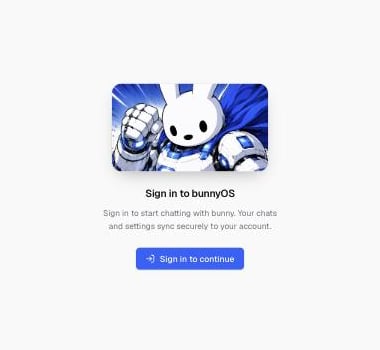
The sign-in screen you see on first load.
Sign in on first load
When you open the app, you see a full-screen Sign in to bunnyOS prompt. Nothing else works until you sign in.1
Click Sign in to continue
This opens the sign-in window.
2
Choose how you want to sign in
You can use a crypto wallet, an email address, or a social account such as Google.
3
Finish the sign-in
Complete the prompts for the method you picked. You land straight in the chat.
Sign-in is handled by Privy, a trusted sign-in service. A wallet is just one of the ways to sign in. You do not need one to use bunnyOS.
What’s tied to your account
Signing in creates your account and saves your work to it. Your chats, settings, connected apps, Carrots, workers, linked wallets, and generated images all follow you when you sign in on another device. A few preferences stay on the device you set them on, so they are not carried across:- Which chat is currently open.
- Which built-in tools you have toggled off.
- Whether interface sounds are on.
Manage your account
To see your account or sign out, open Settings › Account. It shows the email on your account, and it is where you end your session when you want to sign out.Related pages
What is bunnyOS?
The big picture and a tour of the app.
Chat with bunny
Start your first conversation.
Your Carrots
See your balance and top up.