

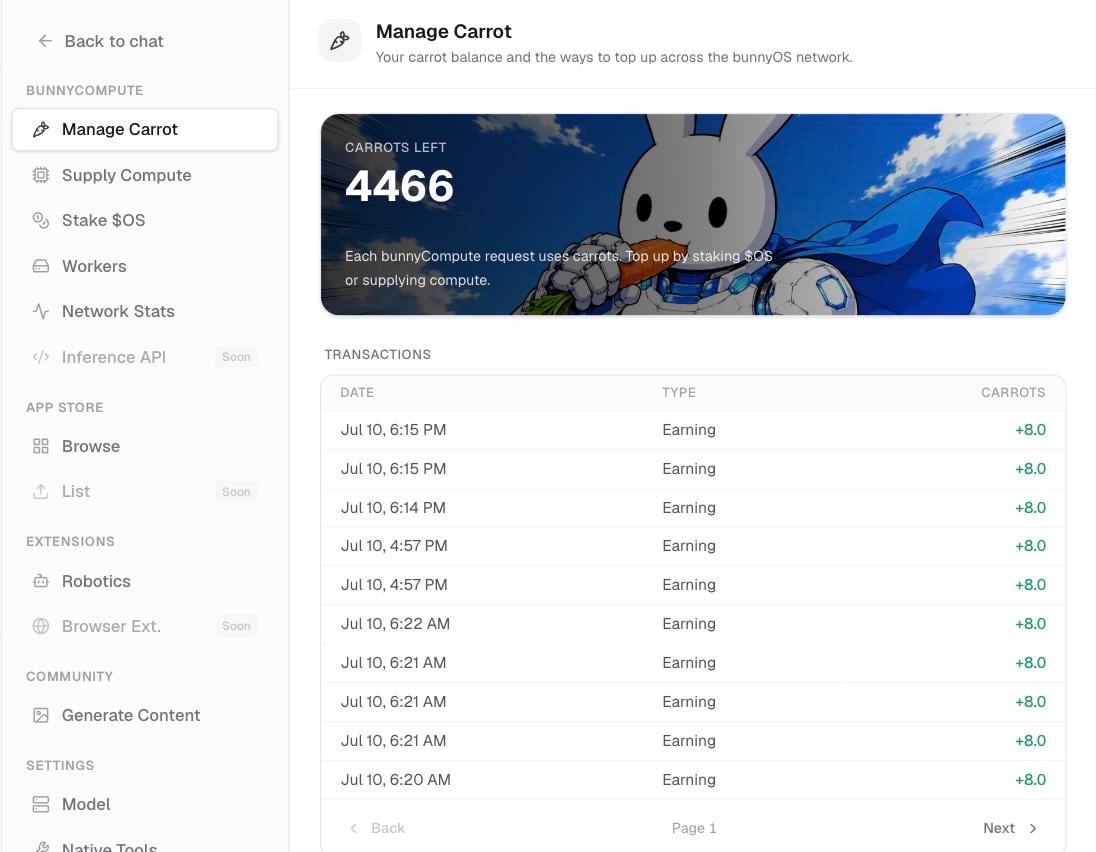
The Manage Carrot screen: live balance, transaction history, and top-up options.
Open your wallet
There are two ways to get there:- In the sidebar, click Menu (shortcut Cmd/Ctrl+Y).
- Or open Settings › Manage Carrot.
Read your balance
The top of the screen shows your live Carrot balance, rounded to one decimal place. This is the number bunny draws from every time it answers a request in the cloud.Read your history
Below the balance is your transaction history, newest first. Click load more at the bottom to see older entries. Each entry is one of these types:Get more carrots
The Get more carrots section lists your top-up options:- Subscribe: a
$4.99/mo top-up, coming soon. - Stake
$OS: lock the$OStoken to earn a daily stream of Carrots. - Supply compute: run a worker and earn Carrots for each job you serve.
Subscribe is coming soon. In the meantime, staking and supplying compute are the two ways to keep your balance topped up.
Related pages
Carrots & OS explained
What Carrots and
$OS are, and how they fit together.Stake OS to earn Carrots
Lock
$OS to earn a daily Carrot stream.How contributing works
Earn Carrots by serving jobs from your machine.