
$OS token (on Base) so it earns Carrots for you. It’s a hands-off way to keep your balance topped up: there’s no trading and nothing to manage day to day. You need to sign in and link a wallet first.
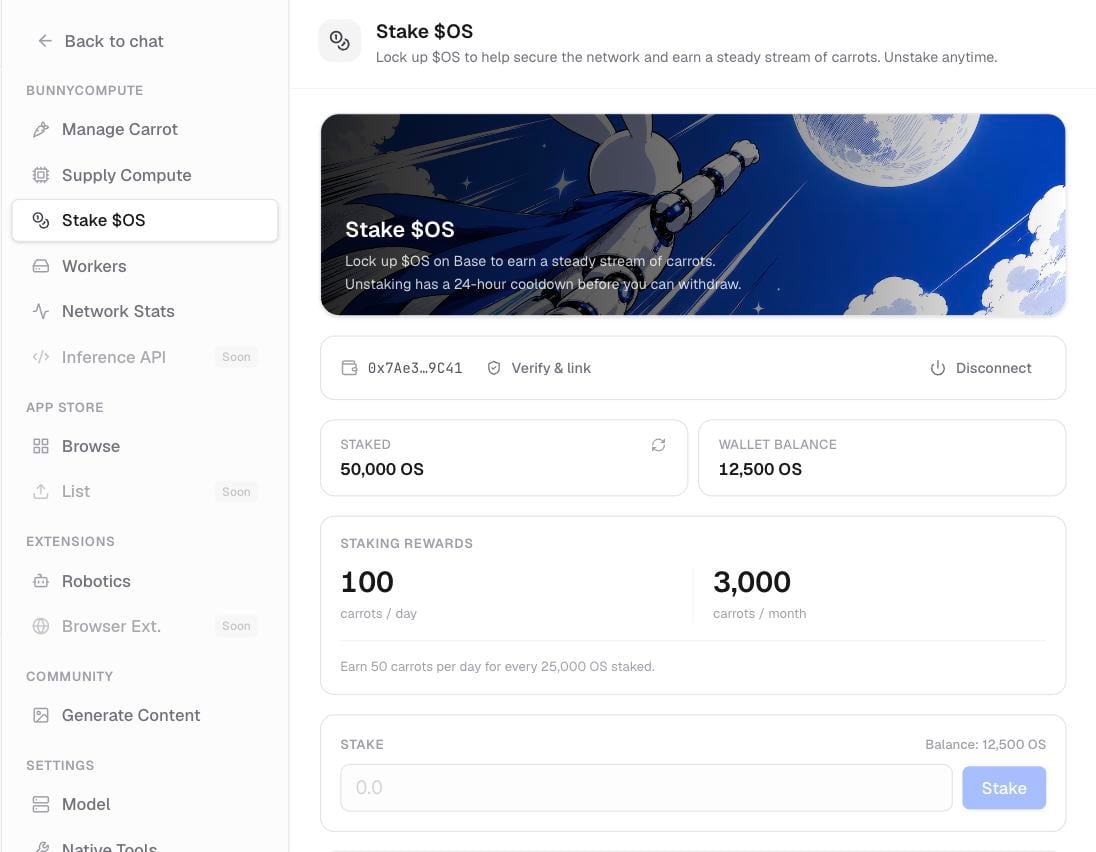
The Stake $OS panel, showing your staked balance, wallet balance, and rewards estimate.
What you earn
Staked$OS pays about 50 Carrots per day for every full 25,000 $OS you have staked. The reward lands automatically in your Carrots history as a Staking entry, with nothing to claim.
Stake your OS
Open Settings › Stake $OS, then:1
Connect your Base wallet
Connect (or reconnect) the Base wallet that holds your
$OS. The panel then shows your wallet balance.2
Enter an amount
Type how much
$OS you want to stake. The rewards estimate updates to show what that amount would earn.3
Choose Stake
Select Stake. If your wallet prompts you to approve first, confirm that, then confirm the stake. The transaction happens on-chain through your wallet.
Unstake and withdraw
Unstaking has a 24-hour cooldown: you request it, wait a day, then withdraw. Your$OS stays staked and keeps earning until you withdraw.
1
Request unstake
In the same Stake $OS panel, choose Request unstake for the amount you want back. This starts the 24-hour cooldown.
2
Wait 24 hours
Your
$OS is locked during the cooldown. You can’t withdraw it early.3
Withdraw
After the cooldown ends, choose Withdraw to return the
$OS to your Base wallet. Confirm the transaction in your wallet.Staking, unstaking, and withdrawing all happen on-chain and need a transaction in your wallet. The daily Carrot rewards, by contrast, land automatically inside bunnyOS.
Related pages
Carrots & OS explained
What Carrots and
$OS are, and every way to get and spend Carrots.Your Carrots
Check your balance, review your transaction history, and top up.
Signing in
Sign in and link the wallet you’ll stake from.