> ## Documentation Index
> Fetch the complete documentation index at: https://docs.bunnyos.ai/llms.txt
> Use this file to discover all available pages before exploring further.
# Generate bunny images
> Turn a text prompt into an on-brand bunny mascot image and share it on the public bunny wall.
Describe a bunny, and bunnyOS creates an on-brand mascot image from your words. Every image you make is posted to a shared public gallery called the **bunny wall**, so you can browse what everyone else has dreamed up too.
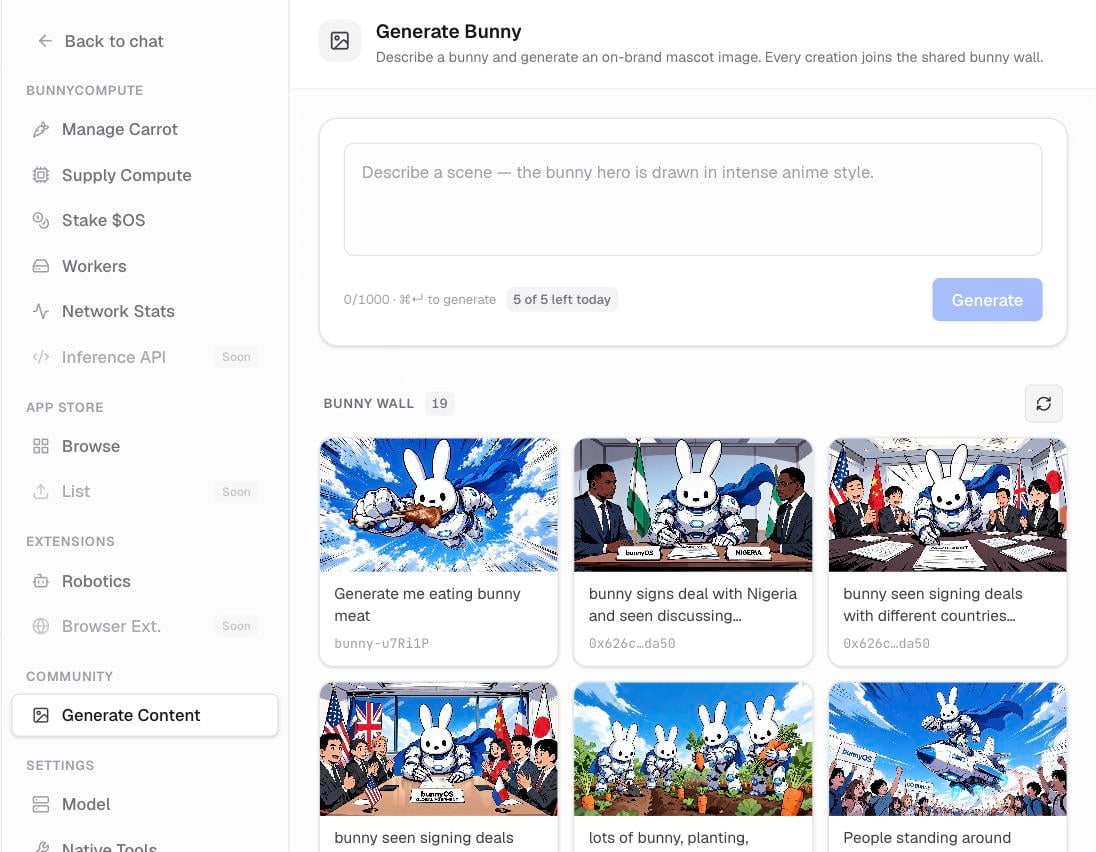 ## Make a bunny image
Go to **Settings** › **Community** and choose **Generate**. You can also press **Cmd/Ctrl+I** from anywhere in the app.
Type a short description of the bunny you want, such as an astronaut bunny or a bunny sipping coffee.
Press **Generate**, or **Cmd/Ctrl+Enter**, and wait a moment for your image to appear.
You need to be signed in to generate images. There is also a daily limit on how many you can make, so it resets each day.
## Save your creations
You can download any image you make and keep it on your device. Use it as a profile picture, a sticker, or wherever you like.
## The bunny wall
Every image you generate is added to the public bunny wall automatically. It shows everyone's creations with the newest first, and each one is tagged with the creator's shortened wallet address and the prompt that made it. Scroll through for inspiration before you write your own prompt.
The bunny wall is public. Anything you generate is visible to everyone, so keep your prompts friendly.
## Related pages
Meet the physical desk companion and reserve yours.
Have a conversation with your personal bunny agent.
## Make a bunny image
Go to **Settings** › **Community** and choose **Generate**. You can also press **Cmd/Ctrl+I** from anywhere in the app.
Type a short description of the bunny you want, such as an astronaut bunny or a bunny sipping coffee.
Press **Generate**, or **Cmd/Ctrl+Enter**, and wait a moment for your image to appear.
You need to be signed in to generate images. There is also a daily limit on how many you can make, so it resets each day.
## Save your creations
You can download any image you make and keep it on your device. Use it as a profile picture, a sticker, or wherever you like.
## The bunny wall
Every image you generate is added to the public bunny wall automatically. It shows everyone's creations with the newest first, and each one is tagged with the creator's shortened wallet address and the prompt that made it. Scroll through for inspiration before you write your own prompt.
The bunny wall is public. Anything you generate is visible to everyone, so keep your prompts friendly.
## Related pages
Meet the physical desk companion and reserve yours.
Have a conversation with your personal bunny agent.