> ## Documentation Index
> Fetch the complete documentation index at: https://docs.bunnyos.ai/llms.txt
> Use this file to discover all available pages before exploring further.
# Where bunny runs
> Choose whether bunny runs privately on your own device or in the bunnyCompute cloud, and switch between the two anytime.
bunny can run in two places: privately on your own device, or in the bunnyCompute cloud. Both give you the same bunny in the same chat. The difference is where the thinking happens, what it costs, and what your device needs. You can switch at any time.
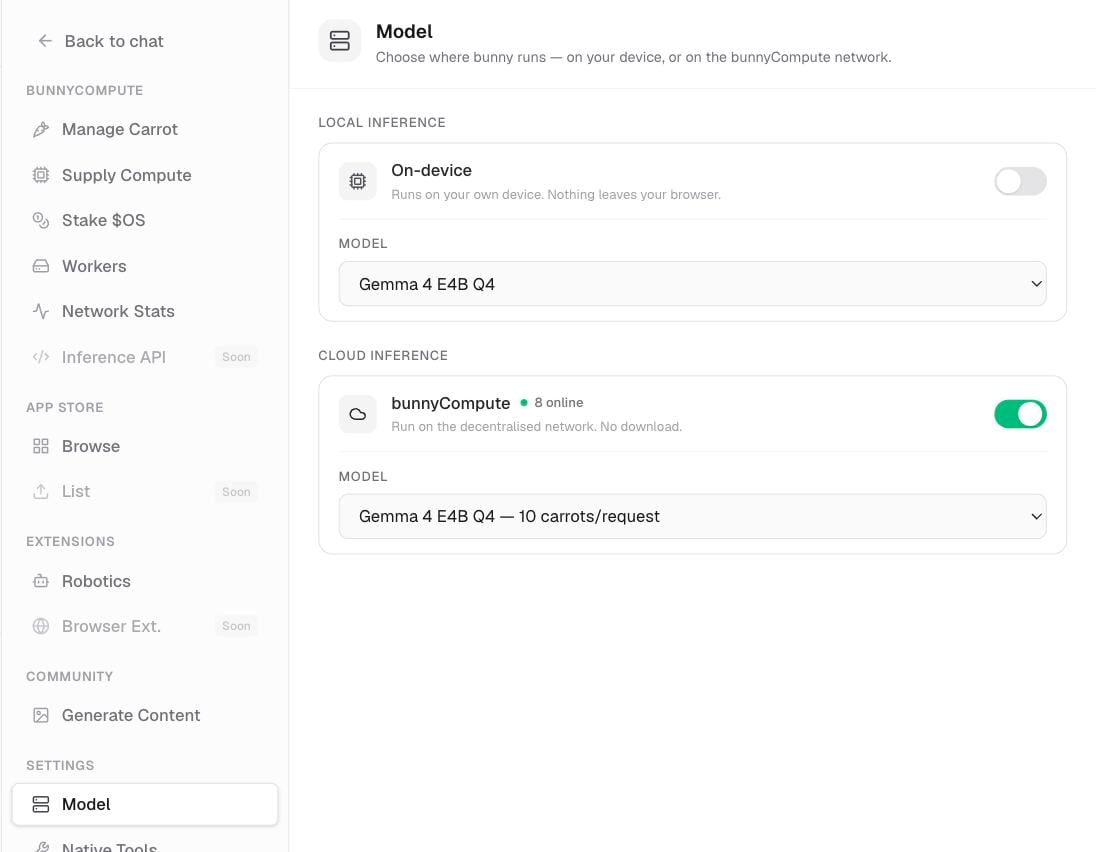 Only one model is available today, so this choice is about **where** bunny runs, not which model you get. The replies are the same either way.
## On-device: private and free
On-device runs bunny's model fully inside your browser, using your computer's graphics. Nothing you type ever leaves your machine, and it costs nothing to use.
Choose this when privacy matters or you want to chat for free without spending any Carrots.
The first time you start on-device, bunny downloads its model. This is a multi-gigabyte download shown with a progress screen, so give it a moment on a good connection. After that first time, the model is cached on your device, so later visits load fast.
On-device needs a recent desktop version of Chrome or Edge. iPhone, iPad, and very low-memory devices can't run it and are steered to the cloud instead.
## Cloud: bunnyCompute
Cloud runs bunny on bunnyCompute, a decentralised network of contributor machines, instead of on your own device. There's no download, and it works even where on-device isn't supported, such as on a phone or tablet.
Choose this when your device can't run on-device, or when you'd rather not wait for the model download.
Each cloud request spends Carrots. A live indicator shows how many workers are online. You need to be signed in to use the cloud.
Curious where those Carrots go, or want to be a worker yourself? See [How contributing works](/user/compute/overview).
## Side-by-side comparison
| | On-device | Cloud (bunnyCompute) |
| ------------ | ------------------------------------------------ | -------------------------------- |
| Privacy | Nothing leaves your machine | Runs on the bunnyCompute network |
| Cost | Free | 10 Carrots per request |
| Download | Multi-gigabyte model the first time, then cached | None |
| Requirements | Recent desktop Chrome or Edge | Signed in; works on any device |
## How to switch
Use the **Local** and **Cloud** buttons right in the chat composer to flip between the two before you send a message.
Open **Settings** › **Model** and use the **On-device** / **bunnyCompute** switch. This sets your default for new chats.
On the **Meet bunny!** welcome screen, pick **Use local inference** or **Use carrots** to get started. If on-device can't start on your device, a **Use carrots** fallback appears so you can chat right away.
## Related pages
Check your balance and top up before chatting in the cloud.
What Carrots are, and the ways to get and spend them.
The other side of the cloud: supplying compute and earning Carrots.
The conversation itself: composing, streaming replies, and history.
Only one model is available today, so this choice is about **where** bunny runs, not which model you get. The replies are the same either way.
## On-device: private and free
On-device runs bunny's model fully inside your browser, using your computer's graphics. Nothing you type ever leaves your machine, and it costs nothing to use.
Choose this when privacy matters or you want to chat for free without spending any Carrots.
The first time you start on-device, bunny downloads its model. This is a multi-gigabyte download shown with a progress screen, so give it a moment on a good connection. After that first time, the model is cached on your device, so later visits load fast.
On-device needs a recent desktop version of Chrome or Edge. iPhone, iPad, and very low-memory devices can't run it and are steered to the cloud instead.
## Cloud: bunnyCompute
Cloud runs bunny on bunnyCompute, a decentralised network of contributor machines, instead of on your own device. There's no download, and it works even where on-device isn't supported, such as on a phone or tablet.
Choose this when your device can't run on-device, or when you'd rather not wait for the model download.
Each cloud request spends Carrots. A live indicator shows how many workers are online. You need to be signed in to use the cloud.
Curious where those Carrots go, or want to be a worker yourself? See [How contributing works](/user/compute/overview).
## Side-by-side comparison
| | On-device | Cloud (bunnyCompute) |
| ------------ | ------------------------------------------------ | -------------------------------- |
| Privacy | Nothing leaves your machine | Runs on the bunnyCompute network |
| Cost | Free | 10 Carrots per request |
| Download | Multi-gigabyte model the first time, then cached | None |
| Requirements | Recent desktop Chrome or Edge | Signed in; works on any device |
## How to switch
Use the **Local** and **Cloud** buttons right in the chat composer to flip between the two before you send a message.
Open **Settings** › **Model** and use the **On-device** / **bunnyCompute** switch. This sets your default for new chats.
On the **Meet bunny!** welcome screen, pick **Use local inference** or **Use carrots** to get started. If on-device can't start on your device, a **Use carrots** fallback appears so you can chat right away.
## Related pages
Check your balance and top up before chatting in the cloud.
What Carrots are, and the ways to get and spend them.
The other side of the cloud: supplying compute and earning Carrots.
The conversation itself: composing, streaming replies, and history.