> ## Documentation Index
> Fetch the complete documentation index at: https://docs.bunnyos.ai/llms.txt
> Use this file to discover all available pages before exploring further.
# Your Carrots
> Check your Carrot balance, read your transaction history, and find the ways to top up.
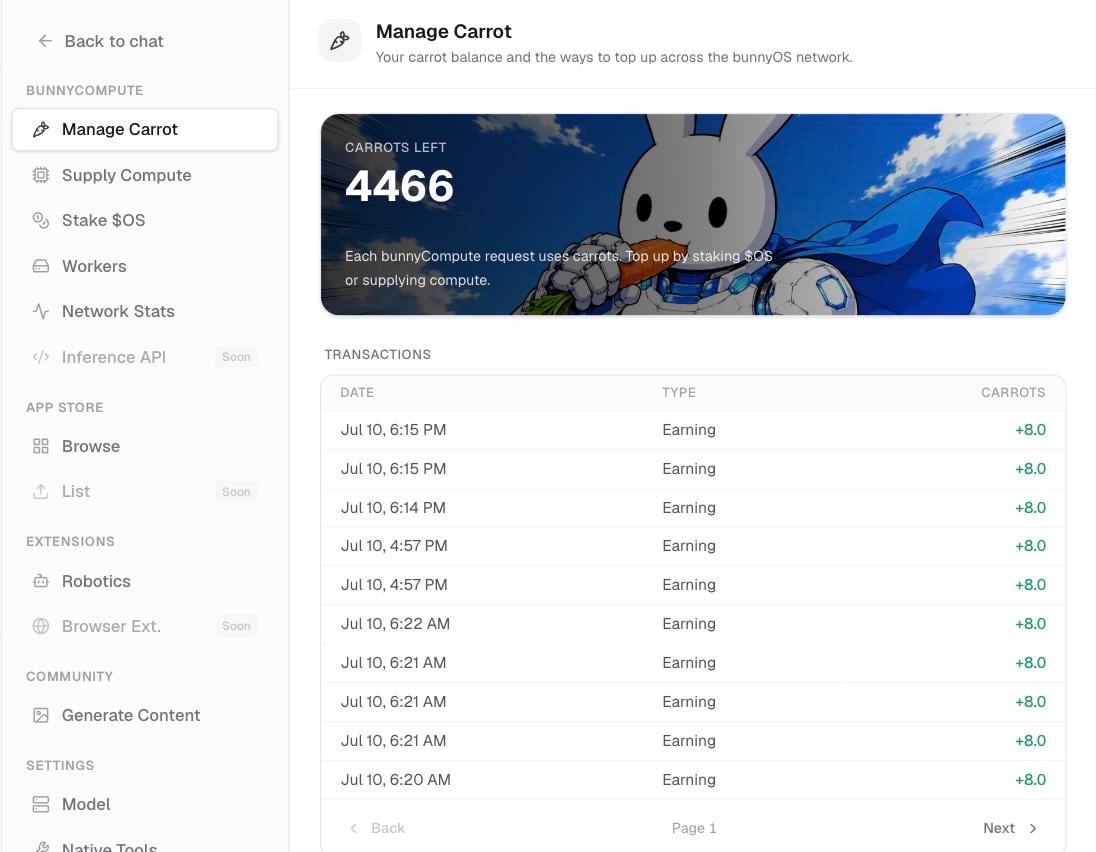
Your Carrots wallet is the one screen that shows how many Carrots you have and where they came from. Open it whenever you want to check your balance or review recent activity.
 ## Open your wallet
There are two ways to get there:
* In the sidebar, click **Menu** (shortcut Cmd/Ctrl+Y).
* Or open **Settings** › **Manage Carrot**.
Both open the same screen.
## Read your balance
The top of the screen shows your live Carrot balance, rounded to one decimal place. This is the number bunny draws from every time it answers a request in the cloud.
New to how Carrots work? Start with [Carrots & OS explained](/user/carrots/explained) for the big picture.
## Read your history
Below the balance is your transaction history, newest first. Click load more at the bottom to see older entries. Each entry is one of these types:
| Type | What it means |
| ---------- | ------------------------------------------------ |
| Grant | Your one-time welcome Carrots for joining. |
| Usage | Carrots spent on a cloud request. |
| Earned | Carrots your worker earned for serving a job. |
| Staking | A daily reward from `$OS` you have staked. |
| Refund | Carrots returned when a request didn't complete. |
| Adjustment | A manual correction to your balance. |
## Get more carrots
The **Get more carrots** section lists your top-up options:
* **Subscribe**: a `$4.99`/mo top-up, coming soon.
* **Stake `$OS`**: lock the `$OS` token to earn a daily stream of Carrots.
* **Supply compute**: run a worker and earn Carrots for each job you serve.
Subscribe is coming soon. In the meantime, staking and supplying compute are the two ways to keep your balance topped up.
## Related pages
What Carrots and `$OS` are, and how they fit together.
Lock `$OS` to earn a daily Carrot stream.
Earn Carrots by serving jobs from your machine.
## Open your wallet
There are two ways to get there:
* In the sidebar, click **Menu** (shortcut Cmd/Ctrl+Y).
* Or open **Settings** › **Manage Carrot**.
Both open the same screen.
## Read your balance
The top of the screen shows your live Carrot balance, rounded to one decimal place. This is the number bunny draws from every time it answers a request in the cloud.
New to how Carrots work? Start with [Carrots & OS explained](/user/carrots/explained) for the big picture.
## Read your history
Below the balance is your transaction history, newest first. Click load more at the bottom to see older entries. Each entry is one of these types:
| Type | What it means |
| ---------- | ------------------------------------------------ |
| Grant | Your one-time welcome Carrots for joining. |
| Usage | Carrots spent on a cloud request. |
| Earned | Carrots your worker earned for serving a job. |
| Staking | A daily reward from `$OS` you have staked. |
| Refund | Carrots returned when a request didn't complete. |
| Adjustment | A manual correction to your balance. |
## Get more carrots
The **Get more carrots** section lists your top-up options:
* **Subscribe**: a `$4.99`/mo top-up, coming soon.
* **Stake `$OS`**: lock the `$OS` token to earn a daily stream of Carrots.
* **Supply compute**: run a worker and earn Carrots for each job you serve.
Subscribe is coming soon. In the meantime, staking and supplying compute are the two ways to keep your balance topped up.
## Related pages
What Carrots and `$OS` are, and how they fit together.
Lock `$OS` to earn a daily Carrot stream.
Earn Carrots by serving jobs from your machine.