> ## Documentation Index
> Fetch the complete documentation index at: https://docs.bunnyos.ai/llms.txt
> Use this file to discover all available pages before exploring further.
# Stake OS to earn Carrots
> Lock the $OS token on Base to earn a steady daily stream of Carrots, and learn how to stake, unstake, and withdraw.
 Staking locks up your `$OS` token (on [Base](https://base.org)) so it earns Carrots for you. It's a hands-off way to keep your balance topped up: there's no trading and nothing to manage day to day. You need to [sign in](/user/getting-started/sign-in) and link a wallet first.
 ## What you earn
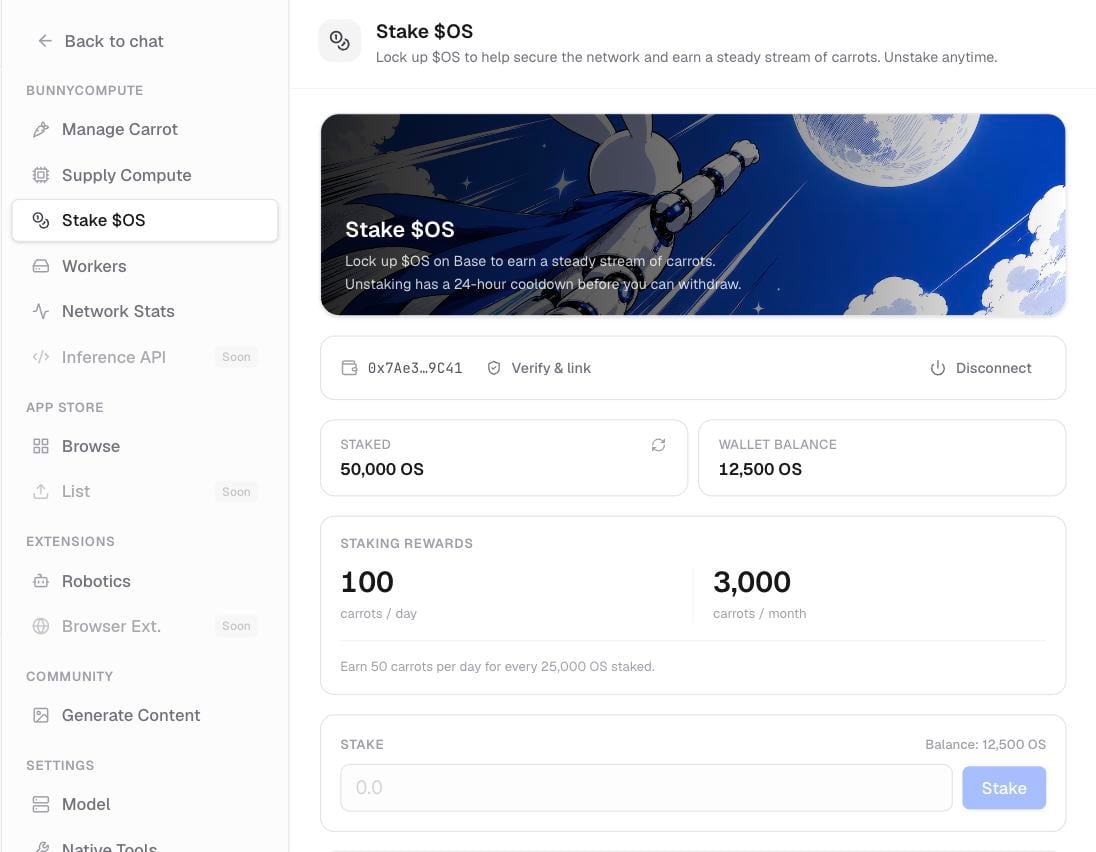
Staked `$OS` pays about **50 Carrots per day for every full 25,000 `$OS`** you have staked. The reward lands automatically in your [Carrots history](/user/carrots/your-carrots) as a **Staking** entry, with nothing to claim.
## Stake your OS
Open **Settings** › **Stake \$OS**, then:
Connect (or reconnect) the Base wallet that holds your `$OS`. The panel then shows your wallet balance.
Type how much `$OS` you want to stake. The rewards estimate updates to show what that amount would earn.
Select **Stake**. If your wallet prompts you to approve first, confirm that, then confirm the stake. The transaction happens on-chain through your wallet.
Once it confirms, your staked balance updates and your daily Carrots begin.
## Unstake and withdraw
Unstaking has a **24-hour cooldown**: you request it, wait a day, then withdraw. Your `$OS` stays staked and keeps earning until you withdraw.
In the same **Stake \$OS** panel, choose **Request unstake** for the amount you want back. This starts the 24-hour cooldown.
Your `$OS` is locked during the cooldown. You can't withdraw it early.
After the cooldown ends, choose **Withdraw** to return the `$OS` to your Base wallet. Confirm the transaction in your wallet.
Staking, unstaking, and withdrawing all happen on-chain and need a transaction in your wallet. The daily Carrot rewards, by contrast, land automatically inside bunnyOS.
## Related pages
What Carrots and `$OS` are, and every way to get and spend Carrots.
Check your balance, review your transaction history, and top up.
Sign in and link the wallet you'll stake from.
## What you earn
Staked `$OS` pays about **50 Carrots per day for every full 25,000 `$OS`** you have staked. The reward lands automatically in your [Carrots history](/user/carrots/your-carrots) as a **Staking** entry, with nothing to claim.
## Stake your OS
Open **Settings** › **Stake \$OS**, then:
Connect (or reconnect) the Base wallet that holds your `$OS`. The panel then shows your wallet balance.
Type how much `$OS` you want to stake. The rewards estimate updates to show what that amount would earn.
Select **Stake**. If your wallet prompts you to approve first, confirm that, then confirm the stake. The transaction happens on-chain through your wallet.
Once it confirms, your staked balance updates and your daily Carrots begin.
## Unstake and withdraw
Unstaking has a **24-hour cooldown**: you request it, wait a day, then withdraw. Your `$OS` stays staked and keeps earning until you withdraw.
In the same **Stake \$OS** panel, choose **Request unstake** for the amount you want back. This starts the 24-hour cooldown.
Your `$OS` is locked during the cooldown. You can't withdraw it early.
After the cooldown ends, choose **Withdraw** to return the `$OS` to your Base wallet. Confirm the transaction in your wallet.
Staking, unstaking, and withdrawing all happen on-chain and need a transaction in your wallet. The daily Carrot rewards, by contrast, land automatically inside bunnyOS.
## Related pages
What Carrots and `$OS` are, and every way to get and spend Carrots.
Check your balance, review your transaction history, and top up.
Sign in and link the wallet you'll stake from.